MacBook screen replacement, Cape Town: a cracked, flickering or blacked-out MacBook screen stops your work dead. The good news: in most cases the screen can be replaced and your MacBook is back to full brightness the same day. At Fix I.T. Claremont we have been repairing MacBook Air and MacBook Pro displays in Cape Town since 2014, and this guide covers everything you need to know about MacBook screen replacement in Cape Town: the warning signs, what affects the cost, how long it takes and how to avoid paying for the wrong repair.
Quick answer: Most MacBook screen replacements are done the same day when the part is in stock. Every repair starts with a free assessment and a fixed quote before any work begins, and all work is guaranteed. WhatsApp us on 084 745 4897 with your model number for a quote.
7 Signs You Need a MacBook Screen Repair
Not every display fault means a new screen, so before any MacBook screen replacement Cape Town customers get a proper diagnosis from us. Here are the symptoms we see every week, and what they usually point to:
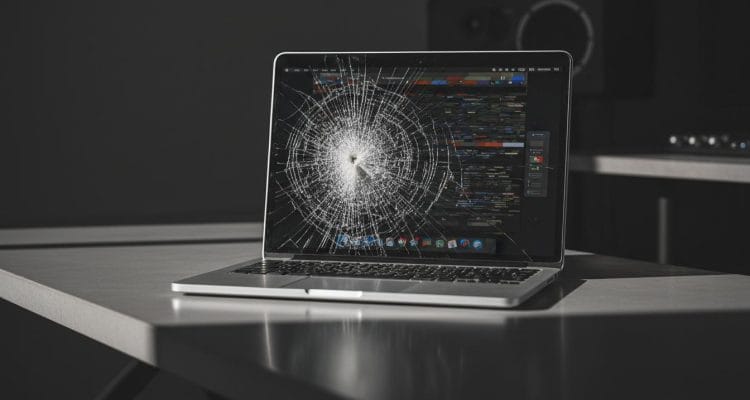
- Cracked or shattered glass – a cracked MacBook screen usually comes from a drop, or from closing the lid on a pen, earphones or a crumb. Cracks spread over time, so it is worth repairing early.
- Black or purple ink-like patches – the LCD layer underneath the glass is damaged. This needs a display replacement.
- Vertical or horizontal lines – can be a damaged panel, but may also be a display cable or logic board fault. We test before quoting so you don’t pay for a screen you don’t need.
- Flickering, or the screen only works at certain lid angles – classic sign of a worn display flex cable. On 2016–2018 MacBook Pro models this is known as “Flexgate” and often shows as a “stage light” effect along the bottom edge.
- Blotchy, worn-looking coating – the anti-reflective coating peeling off Retina displays (“Staingate”). It looks like stains that won’t wipe off.
- Screen is black but the Mac is on – you hear the startup chime or see the keyboard backlight, but the display stays dark. Could be the backlight, the display or the board – a diagnosis tells us which.
- Dim screen or dark spots – often a backlight failure, sometimes after liquid damage.
If your screen problem started after a spill, read our guide to MacBook water damage repairs in Cape Town first – liquid damage needs to be dealt with quickly, before corrosion spreads.
Screen vs. Display Assembly: Why It Matters for the Price
On older laptops you could swap just the LCD panel. Modern MacBooks are different. On most MacBook Air and MacBook Pro models from 2016 onwards, the glass, LCD, backlight, cables and webcam are bonded into one display assembly (the whole lid). This applies to both MacBook Air screen replacement and MacBook Pro screen replacement. Depending on the model and the damage, a repair is done one of two ways:
- Full display assembly replacement – the complete lid is replaced. This is the most reliable route and gives a factory-quality result.
- Panel-only replacement – on some models only the LCD panel is replaced and your original housing is kept. This can lower the cost where it is possible.
We will tell you which options are available for your exact model and what each one costs, so you can choose.
How Much Does a MacBook Screen Replacement Cost in Cape Town?
The price of a MacBook screen replacement depends on a few things:
- Your model and year – a MacBook Air screen replacement usually costs less than a MacBook Pro screen replacement, especially on 14- and 16-inch models with a Liquid Retina XDR display.
- Full assembly or panel only – see above.
- Part availability – common models are usually in stock; newer or rarer models may need parts ordered in.
- Other damage – a bent lid, broken hinge or liquid damage can add to the repair.
MacBook Screen Replacement Prices in Cape Town (Guide)
| MacBook model | Screen replacement from |
|---|---|
| MacBook Air 13″ (Intel, 2018–2020) | R3,999 |
| MacBook Air 13″ M1 (2020) | R4,499 |
| MacBook Air 13″ M2 / M3 / M4 | R5,999 |
| MacBook Air 15″ M2 / M3 / M4 | R7,999 |
| MacBook Pro 13″ (Intel, M1 & M2) | R4,499 |
| MacBook Pro 15″ & 16″ (Intel) | R6,999 |
| MacBook Pro 14″ (M1 Pro and newer) | R8,999 |
| MacBook Pro 16″ (M1 Pro and newer) | R10,999 |
Guide prices include fitting and VAT. “From” prices apply where a panel-only repair is possible; a full display assembly costs more. Your exact price is confirmed after a free assessment.
Every MacBook screen replacement starts with a free assessment and a fixed quote before we start. There are no hidden fees and no surprises on collection. The fastest way to get a price is to send us your model number (see below) on WhatsApp.
How to find your MacBook model
Click the Apple menu (top-left corner) and choose About This Mac. You’ll see the model name and year, for example “MacBook Air (M2, 2022)”. If the screen is too damaged to read, flip the MacBook over: the model number (for example A2681) is printed in small text on the bottom case.
How Long Does It Take?
When the screen for your model is in stock, most MacBook screen replacements are completed the same day. If a part has to be ordered, we will give you a clear timeframe upfront and keep you updated until your MacBook is ready.
Our MacBook Screen Replacement Process
- Get in touch – WhatsApp or call us with your model and a photo of the damage.
- Book in – drop your MacBook off by appointment at one of our Cape Town locations, or we can collect from your home or office.
- Free assessment and quote – we test the display, cable and board so you only pay for the repair you actually need.
- Repair – your new screen is fitted by an experienced Mac technician.
- Quality check – we test brightness, colour, True Tone, the webcam, hinges and lid sensor before handover.
Is It Worth Replacing a MacBook Screen?
For most MacBooks from the last several years, yes. A screen replacement costs a fraction of a new MacBook, and the rest of the machine – processor, memory, storage and battery – is usually perfectly healthy. Apple Silicon MacBooks (M1, M2, M3, M4) in particular are well worth repairing.
For much older Intel models, we’ll tell you honestly if the repair cost is getting close to the value of the machine, and help you compare options.
Can I Keep Using a Cracked MacBook Screen?
You can, but it’s a risk. Cracks tend to grow with temperature changes and opening and closing the lid, small glass fragments can scratch the keyboard area, and pressure on a damaged panel can cause it to fail completely. If your MacBook is still under AppleCare+, check your cover first; if not, getting it repaired early usually keeps the repair simple.
How to Prevent MacBook Screen Damage
- Never close the lid with anything on the keyboard – pens, earbuds and even crumbs can crack the screen.
- Avoid thick keyboard covers and camera covers; they can put pressure on the display when the lid closes.
- Carry your MacBook in a padded sleeve, not loose in a backpack with books and chargers.
- Open the lid from the centre, not from one corner, to avoid twisting the display.
- Clean the screen with a soft microfibre cloth and a little water only – harsh cleaners can damage the coating.
MacBook Screen Replacement FAQs
Do you replace screens on all MacBook models?
Yes. We do MacBook Air screen replacement and MacBook Pro screen replacement across Intel and Apple Silicon (M1, M2, M3, M4) models. Send us your model number and we’ll confirm availability.
Will I lose my data?
No. A screen replacement doesn’t touch your storage, so your files stay exactly where they are. We still recommend a Time Machine backup before any repair if your Mac is usable.
Will True Tone and the webcam still work?
Yes. When the full display assembly is replaced, the webcam and sensors are part of the new lid, and we test True Tone, brightness and the camera before handing it back.
How much is a MacBook screen replacement in Cape Town?
At Fix I.T. Claremont, MacBook screen replacements start from R3,999 for older MacBook Air models and from R5,999 for M2, M3 and M4 MacBook Airs. MacBook Pro 14″ and 16″ screens start from R8,999. See the price guide above – your exact quote is free.
Is the repair guaranteed?
Yes. All our work is guaranteed, and we check every repair before handover.
Which areas do you serve?
We’re based in Claremont and serve the Southern Suburbs and greater Cape Town, including Wynberg, Lansdowne, Crawford, the Constantia Valley, Lakeside, Muizenberg, Fish Hoek, Sunvalley, Noordhoek, Hout Bay and the Atlantic Seaboard. See all areas we service.
Book Your MacBook Screen Replacement in Cape Town
For fast, guaranteed MacBook screen replacement Cape Town residents and businesses can rely on, Fix I.T. Claremont has been fixing Macs for over 12 years, with 200+ five-star reviews from customers across Google and Facebook. Whether you need a cracked MacBook screen fixed or a MacBook screen repair for flickering, we’ll get you back up and running – usually the same day.
WhatsApp / Call: 084 745 4897
Hours: Mon–Fri 09:00–18:00, Sat 09:00–13:00
Bookings: by appointment – contact us to book in
Looking for other Apple repairs? See our MacBook and Apple repair services in Cape Town.