MacBook Liquid Damage in Cape Town: The First 24 Hours Could Save Your Machine (And Your Wallet)
If you’ve just spilled coffee, wine, or water on your MacBook, you’re probably reading this on your phone while staring at a machine that won’t turn on. Take a breath — but don’t take your time. What you do in the next few hours determines whether your MacBook survives or becomes an expensive paperweight.At Fix I.T. in Claremont, we’ve handled hundreds of liquid-damaged MacBooks over the past decade. Here’s exactly what you need to know.
Step 1: Power It Off Immediately
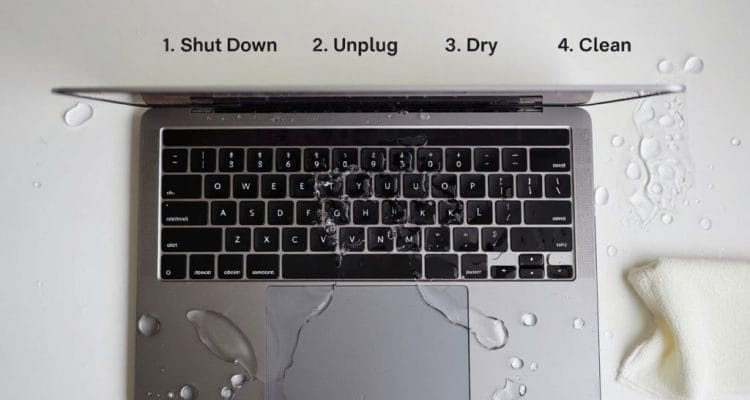
This is non-negotiable. Liquid + electricity = corrosion. The moment liquid hits your logic board, it starts creating conductive pathways where they don’t belong. Every second your MacBook stays on, that corrosion spreads.Press and hold the power button until the screen goes black. If it’s already off, do not try to turn it on to “see if it’s okay.”
Step 2: Forget the Rice
The rice trick is a myth. Rice doesn’t absorb moisture from inside a sealed MacBook chassis — but the dust particles do get into your ports and fans. Instead:
- Unplug the charger
- If possible, disconnect the battery (not easy on modern MacBooks without tools — which is why you bring it to us)
- Keep it unplugged and face-down in a tent shape to let gravity help
Step 3: Don’t Use a Hair Dryer
Heat warps components. A hair dryer pushes moisture deeper into the machine and can melt delicate keyboard ribbon cables. If you need airflow, use a cool fan pointed at the keyboard.
What Liquid Actually Does to Your MacBook
Liquid damage isn’t just about “wetness.” It’s about corrosion — the chemical reaction between water (especially Cape Town’s mineral-rich tap water, coffee, or sugary drinks) and the microscopic copper traces on your logic board.Within 24 hours, you start seeing:
- Oxidation on display circuits (hello, black screen or flickering)
- Shorts on the keyboard controller (keys typing by themselves or not at all)
- Battery management circuit failure (won’t charge, or worse, swells)
The longer you wait, the more components need replacement instead of cleaning.
The Fix I.T. Liquid Damage Process
When you bring your MacBook to our Claremont workshop, here’s what happens:1. Free Assessment (No Obligation) We open the chassis and inspect the logic board under magnification. We’ll tell you exactly what’s damaged and what it will cost before we touch a single component. If it’s not worth repairing, we’ll tell you honestly.2. Ultrasonic Cleaning For non-severe cases, we use professional ultrasonic cleaning to remove corrosion from the logic board without damaging sensitive chips. This fixes roughly 60% of liquid-damage cases that come through our door.3. Component-Level Repair If the cleaning isn’t enough, we perform micro-soldering to replace damaged capacitors, resistors, or power management chips. This is specialist work — not something a general computer shop can do.4. Testing & Warranty Every liquid-damage repair gets a full 48-hour stress test before we hand it back. We stand behind our work.
The Cost Reality
Our liquid damage assessment and ultrasonic cleaning starts at R450. Compare that to Apple’s standard approach: they typically quote a full logic board replacement, which often runs into the thousands — sometimes more than the machine is worth.Our success rate for liquid damage is over 90% if you bring it to us within 24 hours. Wait a week, and that number drops significantly.
Local, Fast, and Honest
We’re located in Claremont, a 10-minute drive from UCT Upper Campus and easily accessible from Rondebosch, Newlands, Kenilworth, and Constantia. Most liquid damage assessments are done same-day.Spilled something on your MacBook? Stop reading and bring it in. The clock is ticking.